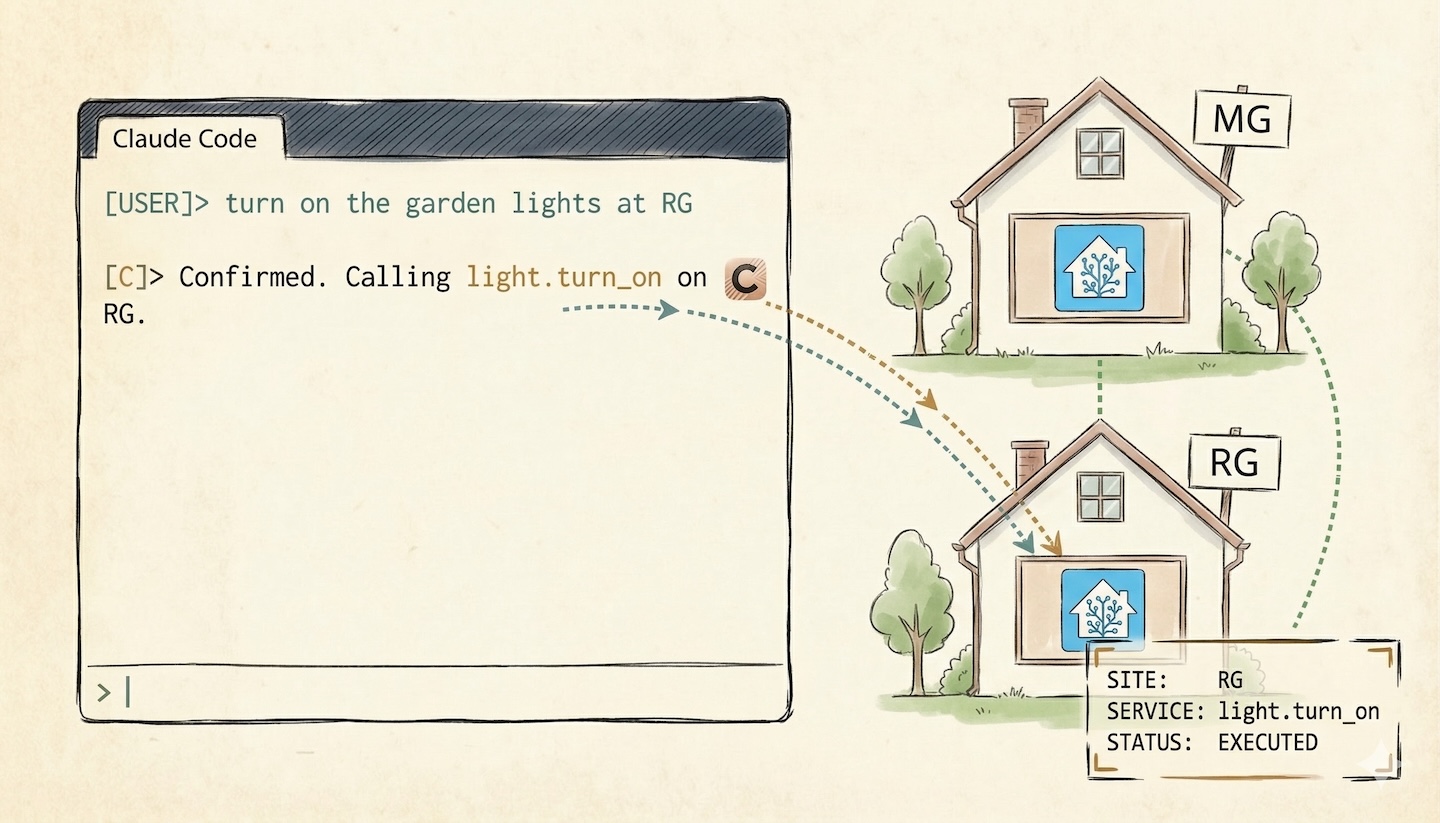
You’re deep in a deploy. Terminal open. Three SSH sessions. A PR review half-done. Then your partner texts: “Did you leave the heater on at Ragusa?”
You could switch to the browser. Find the bookmark. Wait for Home Assistant to load. Navigate to the right entity. Check. Switch back to the terminal. Lose your place in the diff.
Or you could just ask.
I manage two houses. Two Home Assistant instances. Dozens of entities spread across two sites connected by Tailscale. For months, the friction was constant: browser tabs, bookmarked URLs, different tokens, the cognitive tax of context-switching between code and home.
Then I realized something obvious. Claude Code already lives in my terminal. It already runs shell commands. It already understands context.
I just had to teach it where the lights are.
What hass-cli Does (and Doesn’t Do)
hass-cli is the official Home Assistant command-line tool. It talks to HA’s REST API using long-lived access tokens. You can query entity states, call services, list areas and devices, even render Jinja2 templates server-side.
# Get the state of a sensor
hass-cli state get sensor.living_room_temperature

# Turn on a light
hass-cli service call light.turn_on --arguments entity_id=light.garden

# List all areas
hass-cli area list
Simple. Powerful. But there’s a problem.
hass-cli doesn’t know which house you’re talking about. It doesn’t remember your server URLs. It doesn’t pick the right token based on context. It’s a tool. Tools don’t think.
That’s where the skill comes in.
What Claude Code Skills Are
A skill is a Markdown file. That’s it.
No plugin SDK. No compiled extension. No API integration. Just a .md file with clear instructions that teach Claude Code how to do something new. Drop it in ~/.claude/skills/, and Claude picks it up automatically.
Skills can be:
- Auto-triggered by keywords (“home assistant”, “lights”, “thermostat”)
- Manually invoked via
/skillnamein the CLI - Scoped to specific projects or made global
A skill is a well-written instruction manual, for an AI that can actually follow instructions.
Building the /ha Skill
The core challenge: two HA servers, two tokens, and the need for Claude to pick the right one without asking every time.
Here’s the server configuration table from the skill:
| Site | Server URL | Token env var |
|------|-----------|---------------|
| **MG** (default) | `https://mg-homeassistant.[tailnet]:8123` | `HA_API_TOKEN_MG` |
| **RG** | `https://rg-homeassistant.[tailnet]:8123` | `HA_API_TOKEN_RG` |
Both servers are accessible via Tailscale. Tokens live in a .env file, loaded through direnv. Same pattern I use for Ansible secrets. One source of truth, no tokens in Markdown.
The hass-cli Gotcha Nobody Warns You About
You learn this the hard way. In my experience, the --token CLI flag doesn’t always behave as expected when the HASS_TOKEN environment variable is also set. I passed the right token on the command line, but the wrong house kept responding. No error. No warning.
Whether it’s a bug or a precedence quirk, the safest approach is to always override via environment variables, not CLI flags.
HASS_SERVER=https://rg-homeassistant.[tailnet]:8123 \
  HASS_TOKEN="$(grep HA_API_TOKEN_RG ~/Projects/ghost/.env | cut -d= -f2)" \
  hass-cli state get sensor.temperature
Ugly? Yes. Reliable? Always. The skill wraps this pattern so I never think about it again.
Selection Rules
This is the part that makes it feel intelligent. The skill teaches Claude five rules for picking the right server:
- Explicit wins. If I say “RG”, use RG.
- “Both” means both. Run the command against both sites, show combined results.
- No site mentioned? Default to MG (where I spend most of my time).
- Cameras and Frigate? Always check both. Security doesn’t default.
- Always tell me which site you’re querying. No silent assumptions.
These rules are just Markdown bullet points. But they encode months of “wait, which house did you just query?” moments.
Safety
The skill includes a hard rule: confirm before destructive actions. Turning off heating, locking doors, disabling automations. Claude asks first.
This isn’t paranoia. It’s the Bourne principle: trust the tool to execute, but never trust it to decide what’s safe.
What It Looks Like in Practice
Me: “What’s the temperature at RG?”
Claude picks RG based on the explicit mention, constructs the command with the right token, runs it, and returns a clean summary. No entity IDs to remember. No URL to type.
Me: “Turn on the garden lights.”
Claude defaults to MG, identifies the entity, and asks: “I’ll call light.turn_on for light.garden on MG. Confirm?” One word from me. Done.
Me: “Show me all cameras on both sites.”
Both servers queried. Results grouped by site. Entity states summarized. No switching between two browser tabs.
The interaction is natural language in, correct hass-cli invocation out. The skill handles the translation layer: server selection, token injection, command construction, output formatting.
Why This Matters
This isn’t about replacing the Home Assistant dashboard. Dashboards are great for what they do: visual overview, historical graphs, mobile access.
This is about eliminating context switches.
When you’re already in the terminal, already in flow, already mid-thought on a code problem, the cost of switching to a browser is real. It’s not the seconds. It’s the mental state you abandon and may never fully recover.
A skill turns Claude Code from a coding assistant into a universal CLI interface. The pattern is generalizable. Any CLI tool with a clear command structure can become a skill:
- Infrastructure tools (kubectl, terraform, ansible)
- Monitoring (grafana-cli, prometheus queries)
- Communication (slack-cli, gh)
- Anything with a
--helpflag and a predictable output
The skill is just the bridge between natural language and the correct incantation.
The Bigger Picture
The terminal is becoming the universal interface. Not because it’s pretty. Because it’s fast, composable, and now, conversational.
AI is the layer that makes it accessible. You don’t need to memorize entity IDs, flag syntax, or which server holds which device. You describe what you want. The skill translates. The tool executes.
Two houses. Two servers. One /ha command.
You don’t celebrate. You check the sensor readings and keep moving.
Resources:
- hass-cli on GitHub
- Claude Code Skills documentation
- Tailscale for connecting it all together